LoopCheck CLI — WAV Batch Measurements
A downloadable tool
WAV measurements from one command
LoopCheck CLI 0.1.0 is a source-code command-line utility requiring Node.js 20 or later. It is not a standalone Windows app or browser player. It scans one WAV or the top level of a folder and produces a readable console summary and JSON measurements. Source audio stays unchanged on your device.
node loopcheck-cli.cjs samples --loop --report first-report.json
See the output before buying: Download the free manual and actual example report (documentation only; no executable trial).
A worked stereo example
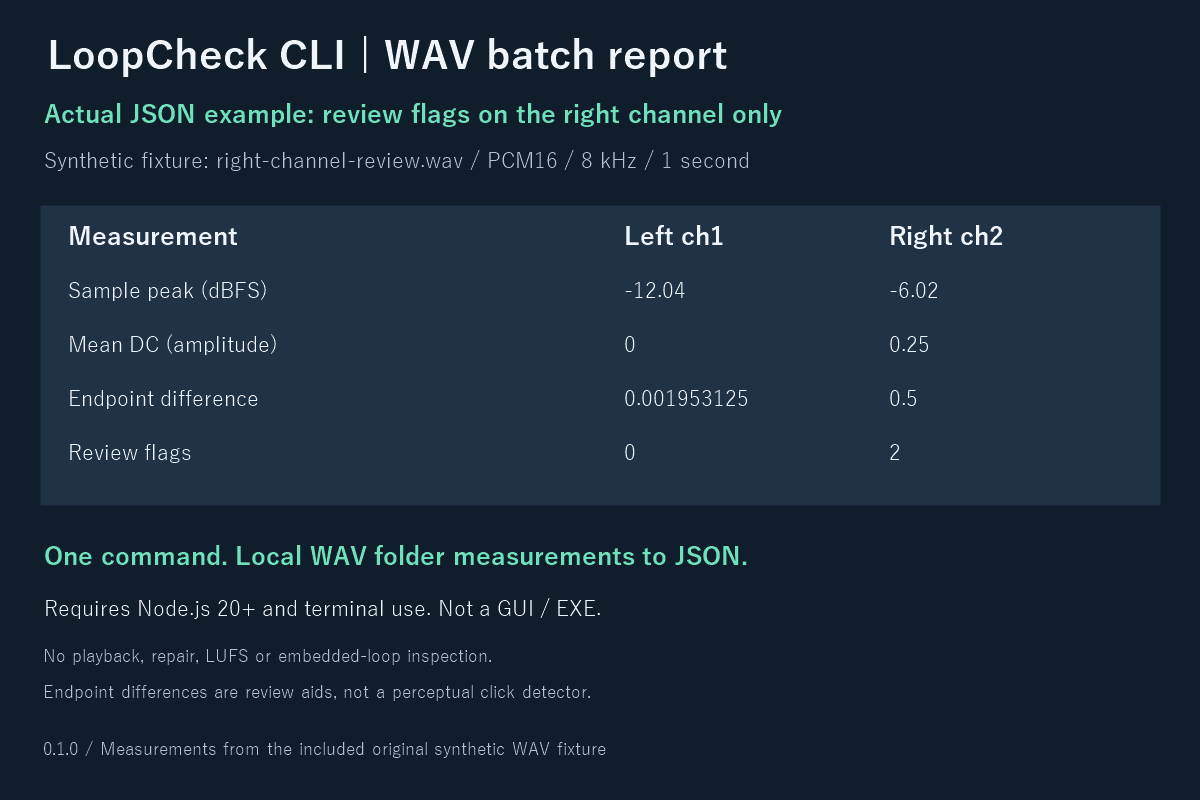
The included synthetic right-channel-review.wav has mean DC 0.25 and endpoint amplitude difference 0.5 in channel 2. The sample report flags that channel for review while channel 1 has no flags. This demonstrates per-channel reporting, not guaranteed detection of audible clicks.
What you get for $3
- The CLI and readable JavaScript analysis source
- English instructions and Japanese quick-start notes
- Three original synthetic WAV fixtures and a sample JSON report
- Permission for personal/commercial internal use and internal modification
Measurements
Per-channel sample peak, unweighted RMS, mean DC offset, near-full-scale sample count, leading/trailing silence, and optional whole-file endpoint amplitude differences. Unsupported or malformed input is reported as an error. Maximum 200 top-level files, 50 MiB each; subfolders and symlinks are skipped. Supported input: little-endian RIFF PCM WAV 8/16/24/32-bit or IEEE float32.
Read before purchasing
This is a small measurement aid with fixed heuristic thresholds, not a perceptual click detector or quality certificate. Listen to your sounds in the target workflow. It does not play, edit, repair, normalize, convert, measure LUFS/true peak, inspect embedded loop regions or verify engine settings. MP3/OGG/FLAC, RF64, compressed and extensible WAV are unsupported. RMS is not perceived loudness. A flagged endpoint may be intentional; an unflagged file may still sound wrong.
Verified here on Windows with Node v24.19.0 using numerical fixtures and real command-to-JSON/error handling checks. Other systems and maximum-sized batches have not been independently tested. The downloadable free sample report/manual lets you inspect the output and requirements before purchasing. Audacity and FFmpeg are free alternatives if you prefer their workflows.
License and support
One-time purchase for this version; no promised future updates or subscription. Internal team use/modification and commercial use of your own audio/reports are permitted. Do not redistribute or resell the tool/source. Mandatory consumer rights are unaffected. Use the product comments for reproducible faults with OS, Node version and a synthetic example; do not post private/client audio or personal information. Reports may include private filenames, so share them deliberately.
Code, documentation and cover were made with AI assistance. Included audio is generated mathematically; no third-party audio or competitor source is included.
日本語・円での購入
BOOTHで日本語説明書付き版を見る(500円)。BOOTHでも本体なしの説明書・実測JSON見本を無料で配布しています。ツール本体の機能は同じです。
Node.js 20以上を使う方向けのWAV一括計測コマンドです。GUIアプリではありません。ピーク・RMS・DC・無音・ファイル全体のループ端点差をJSONに出力します。購入前に無料の説明書とサンプルレポートをご確認ください。音声の加工・再生・完全な異常検知は行いません。
Purchase
In order to download this tool you must purchase it at or above the minimum price of $3 USD. You will get access to the following files:
Download demo
Development log
Leave a comment
Log in with itch.io to leave a comment.